Beyond KPIs: 9 Tasks for Better Operations
When firms start to deploy an ERP for improved management, they often focus on KPIs for better metrics. But creating an effective ERP actually requires a defined series of tasks. In this article, I will focus on those tasks, rather than specific KPIs, and explain why.
Evaluating Options
When firms begin to upgrade their operations by creating a data-driven system, they usually start off by looking at how performance can be measured. Inevitably, they will probably come across articles like "KPI's that help you measure the performance of your firm” like this.
While these KPIs can be useful, when I assumed my previous Operations role, I found multiple similar articles but still wasn't particularly clear what steps I should take to get those KPIs going in the first place. In this article, I want to look beyond KPIs and focus on the specific tasks and processes so you can generate KPI's.
The Key Task List (8+1)
In my experience, there are 8 basic tasks (plus one more for flexibility) that are the key to building an operations system. These core tasks form the backbone of activities the system should manage on a day-to-day basis.
Create a project list - Creating a list of projects with their budget, start and end dates, a PM etc..
Break that project into phases later on, and enter start and end dates
Create a budget for each phase, and for the overall project.
Create an employee list
Create timesheets - Handling timesheets to allow employees to charge their time against those projects
Create Invoices - Creating invoices to bill clients against those charges.
Track expended fee vs budget. - Project tracking (Evaluating project expenditures against original budgets)
Manage project deadlines in a comprehensive form for all projects.
Create custom fields that allow the firm to manage projects in specific ways not anticipated by the ERP developers. (for example, I create a field called “SML” to divide projects into Small, Medium and Large based on fee, so I can group the hundreds of projects to look only at the ones I need that session.)
Some of the tasks above are done by the Operations team, but others like invoicing and timesheets may actually be driven by a Finance group, and may come from a different software package. But I list them all together to create what I consider to be the core task list.
Let’s look at each of the tasks in more detail.
More Detail on Tasks
1: A project list is the basic building block of the entire operation system. By knowing which projects you have and certain key information about each project you can begin to at least understand the scope of the workload that you have. More on project lists in this article.
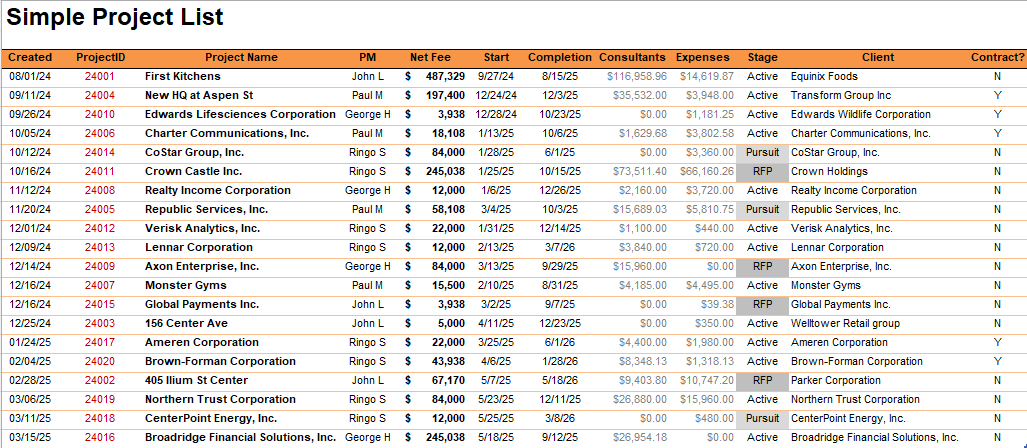
The project list should contain start & end dates, as well as fee and status information
2 & 3: The next set of tasks that follow the project list is to break each project into phases, and give each phase a budget, usually by assigning a percentage to that phase. Then you want to put in an initial start and end date for each phase so you can start to schedule the work and the revenue. The desired result should be a ‘burn curve’, which allows you to see how the revenue/hours on a project should occur over time. I explained the different levels of budgets in this post.
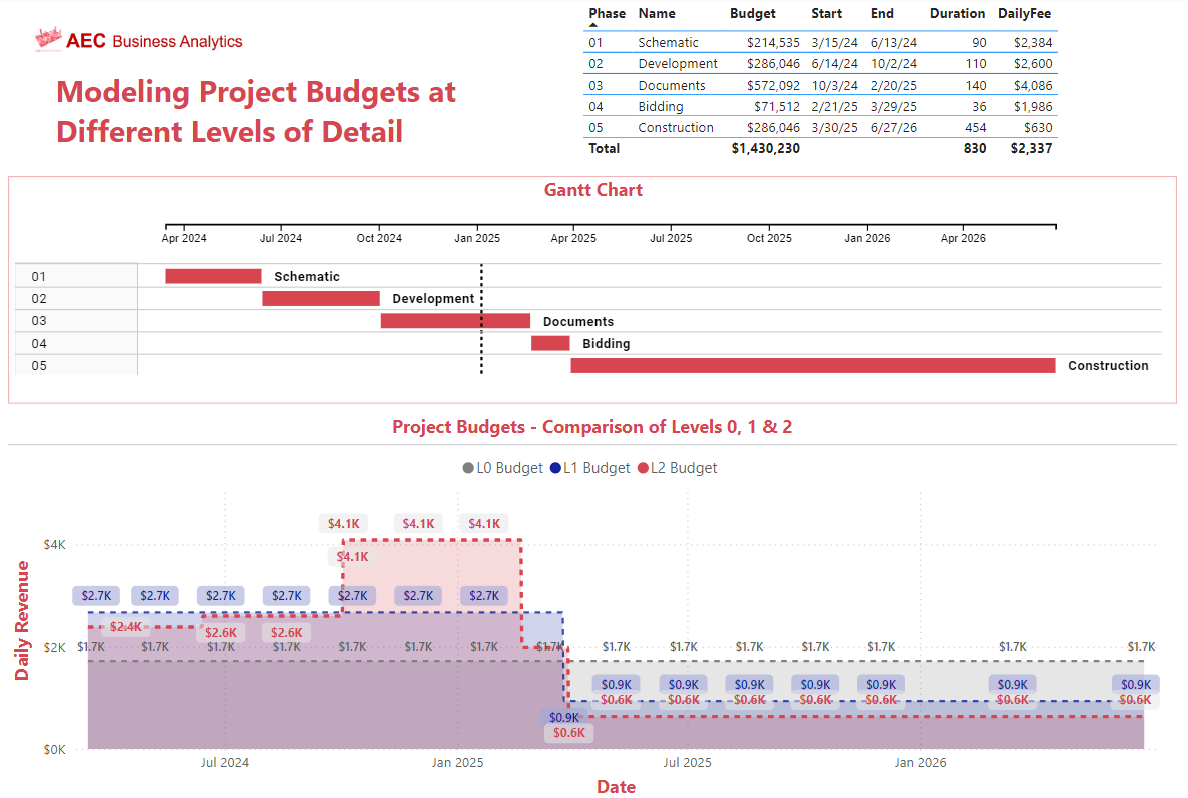
Creating budgets at different levels of detail, depending on information
4: The next task is one that most firms already have in place, which is to create an employee list. Typically, employee lists are required for paycheck as well as HR type of information. The employee list should include the target billing rate for each employee, so that project labor costs can be estimated.
5 & 6: The next two tasks are where the essential operations of the firms happen - timesheets and invoices. Timesheets and invoices are very similar in nature because both are transactions between projects and individual employees.
A timesheet is a transaction where an employee charges time against the project and earns the revenue by accomplishing their work. The amount of hours worked on each time she'd also can be used to measure utilization both hourly utilization and dollar utilization for the staff.
Invoices also are essentially the Billings transaction associated with the labor completed on the project. It's worth noting that sometimes invoicing is not a direct result of hours earned, but can be a ‘percent complete’ of a phase which may have a defined fee associated with it. In that case the hours are simply a way to measure the profitability of the phase, but the revenue generation is essentially dialed in by the contractual agreement.
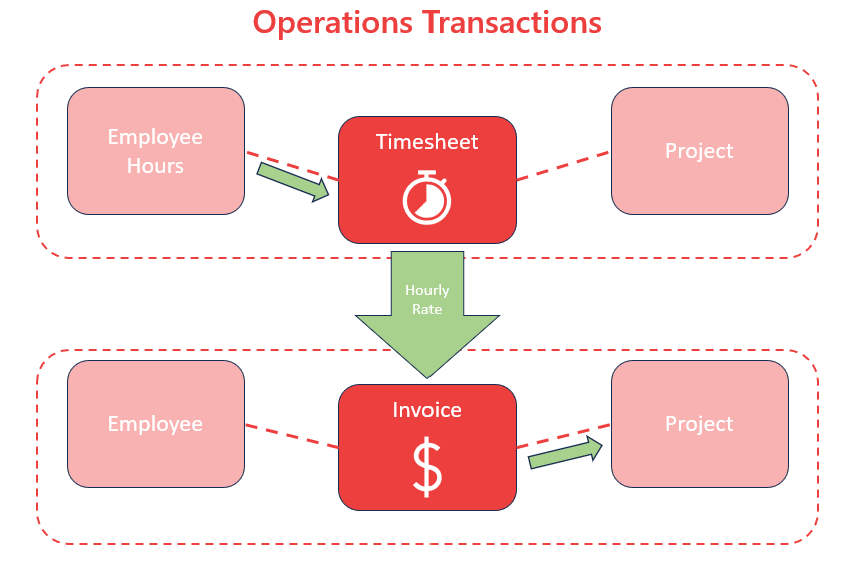
Both timesheets and Invoices rely on transactions between the Employee list and the Project effort. Timesheets often become invoices based on the hourly rate.
7 & 8: The penultimate two tasks are related to tracking project timelines as well as the burn rate.
If budgets have been created, and a baseline burn rate modeled, then invoices and timesheet transactions can be graphed against the budget to gauge profitability and adherence to the anticipated burn rate.
In the tracking chart below, the steady ‘fee’ burn rate can be visualized against the costs associated with timesheets for each project. Often the activity is not steady-state, and has major peaks and troughs, but what is important is “the area under the curve”. If the area under each line matches expectations, then the project is performing as expected. If not, then this chart provides an early warning of a project ‘burning hot’.
In the graph above the projected fee is graphed against the labor amount generated by hours. The invoices issued are shown in green.
9: The final task an operations system should perform is the creation of custom fields. Custom fields are inevitable when you are trying to create reports that focus on certain aspects. In my experience, it's impossible for the ERP developer to anticipate all of the different localizations that a firm may use to classify its work. That's where the ability to create custom fields helps to personalize the ERP to the individual firm.
KPIs vs Tasks
The goal of this article is to focus on key tasks rather than KPIs. Before a firm can generate KPIs, they need to perform operational tasks to build the system that generates those KPIs. One of my early frustrations in Operations was seeing articles talking about KPIs, but not necessarily explaining how to create the system.
For firms who want to get a good handle on the performance of projects in their firm, these eight-plus-one tasks usually form the backbone of operational systems.